

Upgrading the software of a CO2 cutting head is a crucial process that can significantly enhance the performance, precision, and functionality of your laser cutting equipment. As a trusted CO2 Cutting Head [/cnc-machine-parts/laser-machine-parts/co2-cutting-head.html] supplier, we understand the importance of keeping your cutting head's software up - to - date. In this blog, we will guide you through the steps of upgrading the software of a CO2 cutting head, share some best practices, and highlight the benefits of software upgrades.
Why Upgrade the Software of a CO2 Cutting Head?
Before diving into the upgrade process, it's essential to understand why software upgrades are necessary. Firstly, software upgrades often come with bug fixes. Over time, the original software may have glitches that can cause issues such as inaccurate cuts, inconsistent laser power output, or unexpected system shutdowns. By upgrading the software, these bugs can be eliminated, ensuring a more stable and reliable cutting process.
Secondly, new software versions usually offer enhanced features. For example, they may introduce advanced cutting algorithms that can optimize the cutting path, reduce cutting time, and improve the quality of the cut edges. Some upgrades may also add support for new materials or thicker workpieces, expanding the capabilities of your CO2 cutting head.
Finally, software upgrades can improve compatibility with other components of your laser cutting system. As technology evolves, the Laser Power Supply and Laser Tube may receive their own software or firmware updates. Upgrading the CO2 cutting head software ensures seamless communication and cooperation between all parts of the system, maximizing overall performance.
Pre - upgrade Preparations
Backup Existing Data
Before starting the software upgrade, it's crucial to back up all the existing data related to your CO2 cutting head. This includes cutting parameters, user - defined settings, and any custom programs. Losing this data during the upgrade process can be time - consuming to recreate, so make sure to save it to a secure location, such as an external hard drive or a cloud storage service.
Check Compatibility
Verify that the new software version is compatible with your specific model of CO2 cutting head. Our technical support team can provide detailed information on compatibility and help you choose the right software version for your equipment. Using an incompatible software can lead to system malfunctions or even damage the cutting head.
Ensure a Stable Power Supply
A stable power supply is essential during the software upgrade process. A sudden power outage can interrupt the upgrade and cause data corruption or other issues. Make sure your laser cutting system is connected to a reliable power source, and consider using an uninterruptible power supply (UPS) to protect against power fluctuations.
The Software Upgrade Process
Download the Software
Visit our official website to download the latest software version for your CO2 cutting head. Our website provides a dedicated section for software downloads, where you can find the appropriate file based on your cutting head model. Make sure to download the software from a trusted source to avoid security risks.

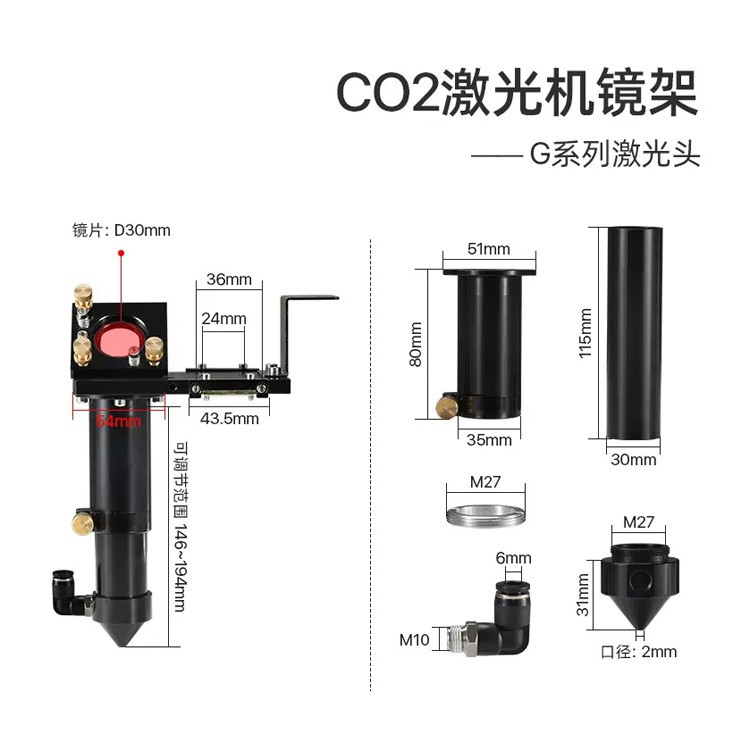
Connect the Cutting Head to a Computer
Use a suitable data cable to connect your CO2 cutting head to a computer. Most cutting heads support USB or Ethernet connections. Ensure that the connection is stable and that the computer recognizes the cutting head device.
Install the Upgrade Tool
Once you have downloaded the software, you may need to install an upgrade tool on your computer. This tool is designed to facilitate the software transfer process from the computer to the cutting head. Follow the installation instructions carefully and make sure to complete all the necessary steps.
Transfer the Software
Open the upgrade tool on your computer and follow the on - screen instructions to transfer the new software to the CO2 cutting head. This process may take some time, depending on the size of the software file and the speed of the connection. Do not interrupt the transfer process until it is completed.
Verify the Upgrade
After the software transfer is finished, power cycle the CO2 cutting head and check if the new software is installed correctly. You can do this by accessing the cutting head's settings menu or by running a test cut. If you encounter any issues, refer to the user manual or contact our technical support team for assistance.
Best Practices for Software Upgrades
Regularly Check for Updates
Make it a habit to regularly check for software updates for your CO2 cutting head. Our company will release new software versions periodically to improve performance and add new features. By staying up - to - date, you can ensure that your cutting head is always operating at its best.
Follow the Manufacturer's Instructions
When upgrading the software, always follow the manufacturer's instructions carefully. These instructions are based on extensive testing and are designed to ensure a safe and successful upgrade process. Deviating from the instructions can lead to problems and may void your warranty.
Test the New Software
After upgrading the software, perform a series of test cuts on different materials and thicknesses. This will help you familiarize yourself with the new features and ensure that the cutting quality meets your expectations. If you notice any issues, document them and contact our technical support team for further assistance.
Benefits of Upgrading the Software
Improved Cutting Quality
The new software often includes advanced algorithms that can optimize the laser beam's focus and power, resulting in cleaner, smoother, and more precise cuts. This is especially important for applications that require high - quality finishes, such as jewelry making or precision engineering.
Increased Productivity
By reducing cutting time and improving the cutting path, software upgrades can significantly increase the productivity of your laser cutting system. You can process more workpieces in less time, which can lead to higher profits and a competitive edge in the market.
Extended Equipment Lifespan
Regular software upgrades can help maintain the health of your CO2 cutting head. By fixing bugs and improving system stability, the cutting head is less likely to experience premature wear and tear, extending its overall lifespan.
Conclusion
Upgrading the software of a CO2 cutting head is a relatively straightforward process that can bring numerous benefits to your laser cutting operations. As a leading CO2 Cutting Head supplier, we are committed to providing high - quality software updates and excellent technical support to our customers. If you have any questions or need assistance with software upgrades, please feel free to reach out to us. Our team of experts is ready to help you make the most of your CO2 cutting head. Whether you are a small - scale workshop or a large - scale manufacturing plant, upgrading your cutting head software can enhance your productivity, improve cutting quality, and keep your equipment competitive in the market.
References
- Manufacturer's user manual for CO2 cutting heads
- Technical documentation provided by our company on software upgrades
- Industry reports on the benefits of software upgrades for laser cutting equipment


