

Multi Process Wood CNC Router
Multi-process woodworking engraving machine is a woodworking machine that can do multiple processes. Multiple heads can be switched arbitrarily, which can easily complete the multiple procedures required for engraving, which effectively saves the cumbersome manual tool change in the middle. It is suitable for wooden doors and furniture.
-
 CNC Cutting MachineCNC cutting machine is an intelligent CNC cutting machine that can be used for cutting, grooving,Add to Inquiry
 -
 Fully Automatic Cutting MachineFully automatic cutting machine can be for panel furniture, cabinets and wardrobes, officeAdd to Inquiry
 -
 1325 CNC Cutting Machine1325 CNC cutting machine Stable performance Simple operation farewell tedious for furnitureAdd to Inquiry
 -
 Woodworking Cutting MachineWoodworking cutting machine is an intelligent CNC cutting machine that can be used for cutting,Add to Inquiry
 -
 Four Process Cutting MachineFour process cutting machine has the characteristics of high precision, it can complete complexAdd to Inquiry


Why choose us
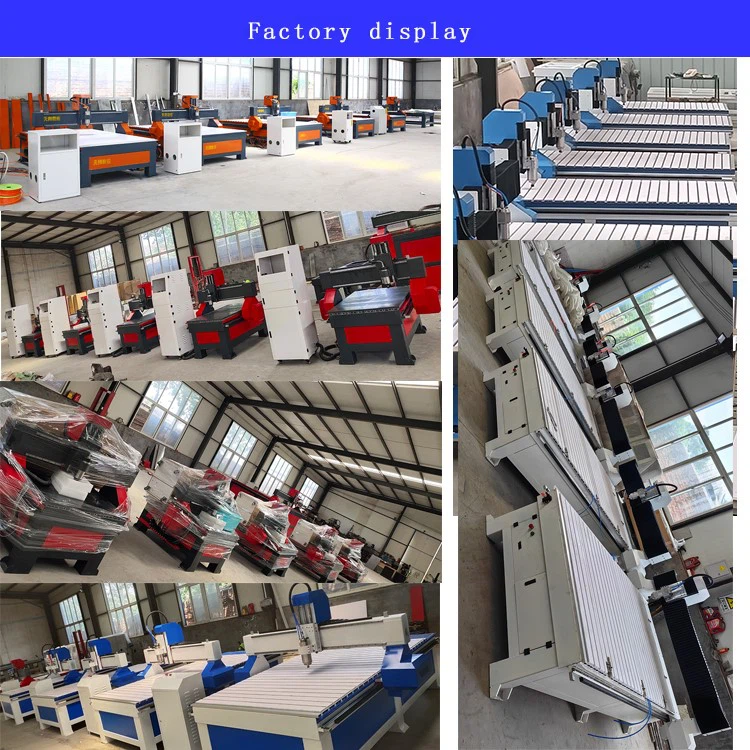
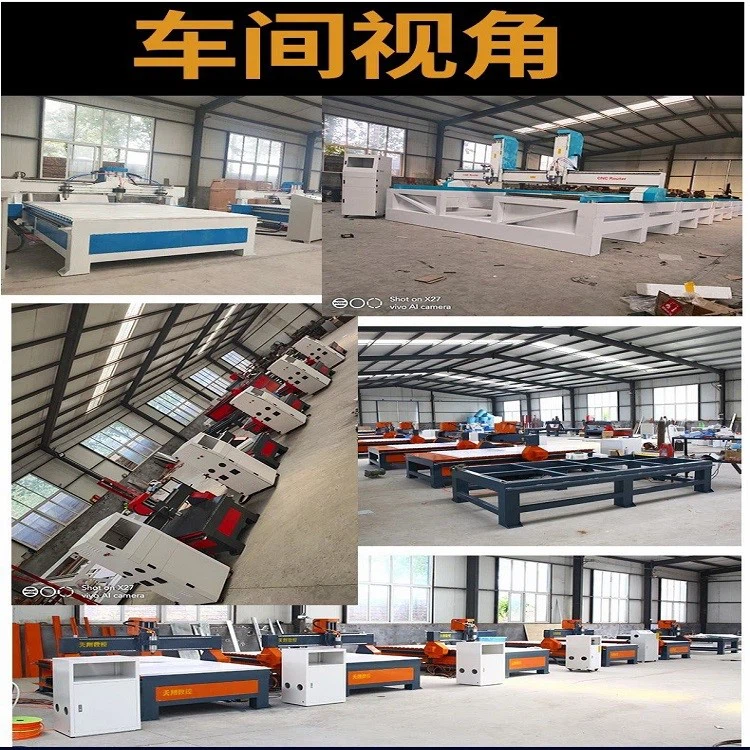
Our Factory
Liaocheng Tianxiang CNC Equipment Co., Ltd. has been producing carving machines for over a decade. We have a skilled design and technical team, our own production facility, and offer customization for various machines, including specialized fixtures. Our experience and technology are well-developed and advanced.
Our Product
We are a high-tech enterprise specializing in the research, production, and sales of a wide range of carving machines. Our products include woodworking carving machines, advertising carving machines, stone carving machines, Buddha carving machines, metal mold machines, jade carving machines, laser carving machines, relief machines, cylindrical carving machines, polystyrene carving machines, and woodworking CNC machining centers.
Product Application
Our machines are used across various industries. These include advertising, woodworking, stone, metal, craft gifts, furniture manufacturing, mold and model making, as well as electronic and electrical industries.
Production Market
Our products are exported to over 40 countries and regions, including South Korea, Russia, the United States, Japan, Thailand, Malaysia, Vietnam, Canada, Iraq, Indonesia, Italy, and Hong Kong.
Benefits of Multi Process Wood CNC Router
Processing Efficiency
A multi-process engraving machine has more than two spindles compared to a standard CNC router, giving it a significant advantage in processing efficiency.
Processing Materials
The multi-process engraving machine can handle all materials that a standard engraving machine can process, including various acrylics, PVC boards, MDF, artificial marble, and aluminum.
Operation Difficulty
The operation of a multi-process engraving machine is similar to that of a standard engraving machine. Both are controlled by a computer system and are easy to operate.
Processing Effect
While both multi-process and standard engraving machines can perform basic functions like flat carving and cutting, the multi-process machine can also create more intricate designs, such as relief and shadow carvings.
Application Scope
In addition to standard applications like doors, windows, cabinets, screens, and furniture carvings, the multi-process engraving machine can handle complex woodwork art carvings that ordinary woodworking engraving machines cannot.
Applicable Customers
The multi-process engraving machine meets all the engraving needs of typical users and can also handle more complicated tasks, making it suitable for customers with advanced engraving requirements.
Factors to Consider When Choosing a Multi-Process CNC Router
Purpose and Project Scope: Determine the primary use of the CNC router, whether for intricate artistic work, industrial manufacturing, or hobbyist projects. This decision will influence the type of machine and features required.
Workspace Constraints: Assess the available space in your workshop or factory. The size of the CNC router should fit comfortably in your workspace without hindering operations.
Budget Considerations: CNC routers vary significantly in price. Define your budget early on and consider the balance between cost and the features you need.
Software and Compatibility: The software that operates the CNC router is crucial. Ensure that it is compatible with your design software and easy to use.
Precision and Accuracy Needs: Consider the level of precision required for your projects. Higher precision machines tend to be more expensive, so align this with your project needs.
Wood
A CNC router machine can work with a variety of woods. Certain types of wood can be considered composite materials, containing resins, lignin, cellulose, and other materials within their structure. A well-designed router can efficiently cut through all types of wood and wood derivatives, such as plywood and medium-density fiberboard (MDF).
Composite Laminates
Extra care is needed when working with composite laminates like fiberglass, carbon fiber, and plywood. You may encounter delamination of the layers as the router cuts through the material.
Plexiglass and Acrylic
CNC routers can also engrave and cut plastic materials such as plexiglass and acrylic. Some of the most common applications include:
Manufacturing industrial parts
Developing parts for LED lighting
Creating advertising materials
Manufacturing signage and souvenirs
Polymer Foam
CNC routers do not produce noticeable wear at the ends of polymer foam, which is advantageous for manufacturers. This allows for the construction of more complex shapes using this material. You can use CNC routers with different types of polymer foam to produce test geometry, aesthetic materials, and custom packaging.
Steel, Brass, and Aluminum
Aluminum and brass are two of the most common metals that can be worked on with a CNC router. These machines can use various blades and bits, allowing for more powerful carving and cutting. With the correct setup, you can also engrave on steel.
Soft and Hard Plastics
Soft and hard plastics, such as low-density polyethylene and polymethyl methacrylate, are excellent materials to use with a CNC router. They can be shaped into various parts and tools for multiple applications across different industries. However, it is advisable to cut these materials using less aggressive settings to prevent deformation from overheating.
Ceramic and Stone
Tiles, sandstone, granite, and sedimentary stone can also be processed using a CNC router. However, since these materials are rigid and hard, it is best to use harder abrasive tools when working with them. Consider using chip breakers, carbide bits, or tools with embedded diamonds.

How Does a Multi-Process Wood CNC Router Work?
The machine consists of a bed table to hold the material and a spindle to hold the CNC router bit. First, G-codes are sent to the CNC controller, and the bit moves to the initial cutting position. At the same time, the operator sets the machining parameters, such as cutting depth and spindle speed. Next, the spindle moves along multiple axes to remove the material and create the desired shape, typically in the X (horizontal), Y (vertical), and Z (height) directions.
Here is the step-by-step process of CNC routing:
3D Modeling
This is the first step. The designer creates a detailed model with all specifications, features, and tolerances.
G-code
The G-codes are generated by processing the 3D model in CAM software. They contain all the machining information.
Machine Setting
During machine setup, appropriate tools and CNC router bits are selected for the desired results. The workpiece must also be securely fastened to the machine bed.
Zero-Positioning
The router bit is set at the starting position.
Machining
The routing bit rotates at high RPM and begins to remove material along the predetermined path.
Monitoring
The machining continues until the final shape is achieved. The process is monitored for possible tool wear, precision deflection, and other defects.
Surface Finishing
Further finishing processes, such as sandblasting, deburring, and brushing, are applied if the as-machined finish is insufficient for functionality or aesthetics.
Quality Control
Final inspections and measurements ensure that the parts meet the desired specifications and standards.
What Are the Applications of a Multi-Process Wood CNC Router?

CNC routers have revolutionized various industries with their precision and versatility. Here are some common applications of CNC routers across different sectors:
Woodworking: CNC routers are extensively used for cutting, carving, and engraving in the woodworking industry, producing intricate designs and smooth finishes on cabinetry, custom furniture, and architectural millwork.
Metal Fabrication: In metalworking, CNC routers facilitate the precise cutting of sheet metals for industrial machinery parts, automotive components, and aerospace elements with complex geometries.
Plastic and Foam Processing: CNC routers are critical in shaping plastics and foams for prototypes, molds, and final products in packaging, insulation, and consumer goods.
Art and Design: Artists and designers leverage CNC routers to bring their digital concepts to life using materials like wood, acrylic, and aluminum, creating 3D sculptures, intricate inlays, and detailed reliefs.
How to Use a Multi-Process Wood CNC Router for Beginners
Starting the CNC Router Machine
1.There are several components to plug in before getting started:
2.Power on the CNC controller box near the wall by turning the ON/OFF switch.
3.Press the green start button to activate the remote controller.
4.Turn on the dust collector (remember to check the dust bags).
5.Start the vacuum table by pushing the white button.
Choosing an End Mill - Introduction
There are various blades to choose from when conducting a project on a CNC router machine. The router bits we will use are known as end mills, which come in different shapes and sizes. Here are some aspects you should understand before embarking on your first project:
Number of flutes
End mill shapes: Flat vs. Ball nose vs. V-bits
Sizing
Choose End Mill - Flutes
Take a look at the first picture included in this step and see if you notice a difference between the two bits displayed. If you can't tell, the CNC bit on the right has four flutes, while the bit on the left has only two. These edges are called flutes, and each serves a specific purpose in a CNC project.
The difference between four-flute and two-flute end mills can be likened to the difference between a wood saw and a hacksaw. A wood saw has fewer and larger teeth, making it ideal for cutting softer materials like wood, while a hacksaw has fine teeth close together, making it suitable for cutting harder materials like metal. For your project, remember that four-flute end mills are best for harder materials (e.g., aluminum, mahogany, plastics, teak), while two-flute end mills are suitable for softer materials (e.g., MDF, plywood, cedar).
Choosing an End Mill - Shapes
Aside from the number of flutes, end mills come in various shapes:
Flat (End Mill): Notice the flat profile at the end of the shaft. This design makes it ideal for clean profile cuts, routing pockets, or drilling holes.
Ballnose: Notice the rounded top at the end of the flutes. This shape is ideal for 3D surfacing but not for profile cutting.
V-bit: Notice the pointed tip of the bit. This shape is great for carving, making it easy to create letters and intricate designs.
Mystery Bits: If you find an interesting bit not listed here while searching in the 'End Mills' cabinet, DO NOT USE UNCLASSIFIED BITS without first consulting the shop manager or the CNC router expert.
Changing the Blade or End Mill
If the end mill you want is already in the CNC machine, follow these instructions to check for tightness:
1.Place the remote controller in the holder, ensuring that you don't press the spindle start button during this process.
2.Use the two wrenches from the CNC router table to carefully loosen the collet from the spindle—mind your knuckles.
3.First, remove the bit from the collet and place the old end mill in the toolbox before replacing the items.
4.Insert the new end mill into the collet high enough to grasp a significant portion of the shank. The new end mill can (but does not need to) stick out of the back of the collet when properly placed. For smaller end mills, push the end mill into the collet until it's about 2 mm from the start of the helix.
5.Tighten the nut/collet/end mill back into the spindle—do not overtighten.
Setting Up the Workpiece on the Table
When you plan to cut your plate, it's important to check all four vacuum zones (under the MDF). Ensure there are rubber strips placed around the edges of the zones to maintain vacuum strength. The strength of the vacuum determines how effectively air pressure will hold down your workpieces.
Less vacuum means less pressure.
If you are working with a small plate that doesn't fill an entire vacuum zone, you can use plastic plugs and place shorter rubber strips in the slits to narrow it down.
After that, place the MDF board back on the vacuum table, then place your own plate on top. Select the vacuum zones you would like to use and press the white button to activate the vacuum.
Setting Up the X and Y Axis
Now you need to set each axis to zero. The tip of the router bit should be positioned over the surface of the material at the back left corner. When you are satisfied with the new zero position, press [XY=0] and then [OK].
Maintenance Precautions
1.Before starting the machine each day, check that the air source pressure is above 0.6 MPa, then operate the machine to begin work.
Each morning, check the incoming line of the distribution box to ensure it is correct and safe. Then turn on the power and start production according to the proper operating procedures.
2.Clean any dust from the track before starting processing each day to ensure the overall cleanliness of the machine.
3.After cleaning, turn on the oil injection system to ensure that there is oil in the track of each shaft and check that the oil levels are adequate.
4.At the end of each day, press the green button on the left side of the 9W spindle to manually remove the tool holder. Press the green button again to put it back on the spindle the following day.
5.Check the water level before using the water-cooled vacuum pump each day. Ensure that the water level is at the position of the filter.
6.Daily, drain the air storage tank under the machine bed, the double body (oil-water separator), and the air compressor storage tank to prevent water vapor from entering the air circuit, which could cause rust and failure in the solenoid valve.
Precautions for Weekly Maintenance
1.Remove dust from the power distribution cabinet each week using an air gun (no water). Key electrical components such as drivers, inverters, switching power supplies, AC contactors, relays, and system wiring boards should be kept clean. Check for looseness in the wiring and ensure that no ends are disconnected.
2.Check the pull studs on the tool holder of the tool magazine machining center for looseness and tighten them as needed.
3.Check whether the pressure regulating screw on the cylinder rod of the tool magazine is loose and tighten it if necessary. In winter, turn on the spindle first to allow each spindle to warm up from low speed to high speed for 3-5 minutes.
4.Correct the workpiece origin in the machine system once a week. Check that the grooves and holes on the front and back of the screw on the positioning cylinder are accurate. If there are significant errors, correct them promptly.
Precautions for Monthly Maintenance
1.Drain the water from the water tank and the pump body of the water-cooled vacuum pump each month, and clean out any sludge or impurities in the water tank.
2.Check whether the screws fixing the limit switch are loose each month, and tighten and correct them as needed.
3.Check the hydraulic oil levels in the lower lift and flat assembly each month. If levels are low, add M46# hydraulic oil promptly.
Other Maintenance Matters Needing Attention
1.Each time the nut on the spindle is changed, clean the dust from the inner thread to prevent vibration during high-speed rotation, which can cause cutting issues. When loading the tool, manually rotate a few times and ensure the wire positions align before using a wrench to tighten. Avoid disassembling after tightening due to misalignment.
2.For cutting machines with a drill pack, use the manufacturer’s designated special grease (German Klüber ISOFLE_TOPAS L 32). The drill pack should be filled with grease every 20 working days (two shots with a standard oil gun each time). In winter, allow the drill row to idle for 3 minutes before starting, and do not use other brands of grease. Avoid over-greasing, as improper use can damage the drill bag motor, and any issues caused by incorrect use or excess grease will not be covered under warranty. Contact our company’s after-sales department to purchase the appropriate lubricating grease.
3.Before turning on the vacuum pump in winter, check the fan to ensure it rotates. If it does not, do not turn on the pump. First, melt any ice on the water tank and pump body, then try running it. Each day in winter, drain the water from the water tank before leaving work. There are three screws on the lower side of the pump body that should be loosened to tilt the pump body 45 degrees to drain the water. Alternatively, add antifreeze to prevent freezing the next day. Important: When the temperature in the workshop is below 0 degrees, the vacuum pump must be maintained by draining water or adding antifreeze. This is crucial; otherwise, the vacuum pump may freeze, causing motor burnout and affecting its vacuum adsorption capacity.
All equipment (including vacuum cleaners and vacuum pumps) must be connected to a ground wire to ensure effective grounding.
4.It is recommended to install a voltage stabilizer in the production workshop to prevent damage to electrical components from unstable voltage, which can affect production.
Our Factory
Our company is a high-tech enterprise dedicated to the development, production, and sales of optical and electrical products such as CNC engraving machines, CNC plasma cutting machines, laser engraving machines, laser marking machines, computer engraving machines, and laser welding machines. We are committed to providing customers with high-quality products and services. Since its establishment, the company has always been guided by market demand, driven by technological innovation, and aimed at customer satisfaction, winning widespread market recognition and customer trust.

FAQ
Q: What is Foreign Trade-Express?
Q: How do you maintain a CNC router?
Change Filters. The control box and vacuum pumps have air filters that need to be changed. ...
Lubricate. A machine has a lot of moving parts. ...
Clean and Reliable Air Supply. ...
Proper and Safe Electrical Power.
Q: What is the lifespan of a CNC router?
Q: What are the safety rules for CNC routers?
A mask must be worn when excessive airborne dust or toxic vapours are created. Appropriate footwear with substantial uppers must be worn.
Q: How do you secure wood to CNC router?
Q: How do you test the accuracy of a CNC router?
Q: What you need to know about CNC router?
Q: How noisy is a CNC router?
Q: What speed does CNC router work?
Q: What kind of wood is used for CNC routers?
Q: Can a CNC router replace a table saw?
As one of the most professional slitting machine manufacturers and suppliers in China, we're featured by quality products and good price. Please rest assured to buy high-grade slitting machine for sale here from our factory.
CNC Cutting Machine, slitting machine, 1325 CNC Cutting Machine